Oysterscapes: An essay in photos


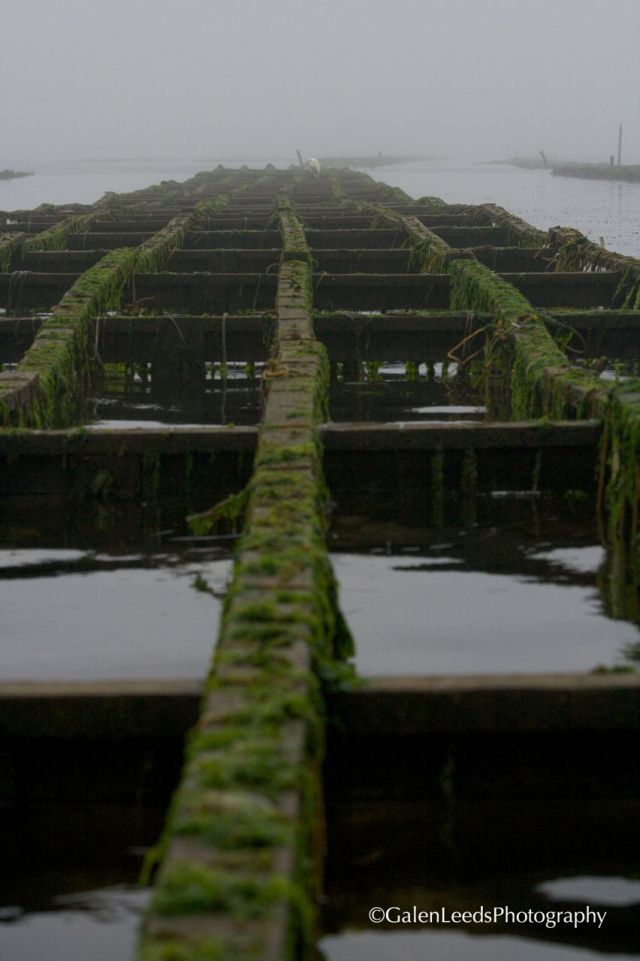
Water seems to be a central theme here in this bucolic stretch of northern California. With Tomales Bay and Drake’s Estero, here in my lap, I find myself hardly able to escape aquaculture during my many paddlings. While it is not the way of life out here, it does touch upon many lives, for better or for worse.

Here are some images sharing the local oyster beds with you. These pictures likely won’t help you decide if oyster farming is a good thing or a bad, but it will give you visions of how the oysters pass from the sea to your table.

“Oysterscapes” is my own term, meaning a photograph where oysters or oyster farming is central part of the image (though not necessarily the focus), be it of landscape or other creatures. Nearly all of these photographs were taken while out kayaking on my local waterways… in fact, there are few areas out here connected to the salty pacific that can be kayaked but have nothing to do with oysters.

Enjoy,

Galen

This slideshow requires JavaScript.

Posted in kayak photography, landscapes, nature photography, Photo Essay, photography | Tagged , , , , , , , | Leave a comment

Anatomy of a photo #7: Oak silhouette


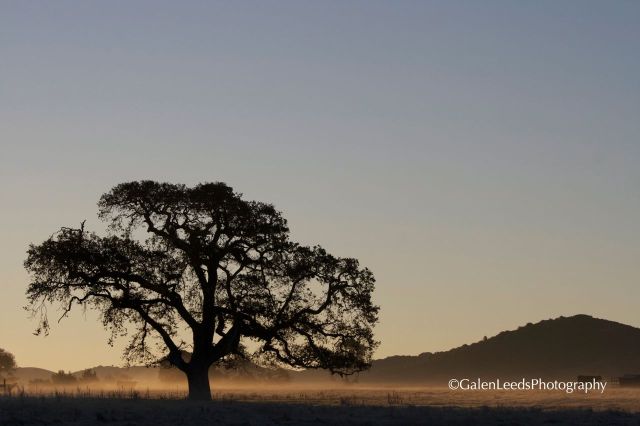
I have different areas that I’ve scouted out over the years, that I know are interesting places for pictures. These are areas that I will visit early, early in the morning, when the light is going through its changes, when it is warm and magic. This silhouette of an oak tree is from one of those places. There is a series of old, twisted oaks in the middle of cow pasture. Each one is separated from the other trees by open spaces, so that it is possible to make portraits of individual, interesting trees. It’s good to have places in your head that you know you would like to shoot, rather than always hoping to chance upon an interesting scene while you are out and about.

For this image, I realized that I could nicely silhouette this oak, thanks to a low lying mist. If the mist hadn’t been there, the trunk of the tree would have been lost in the dark colors of the hills behind. The mist though, was lit up, giving something to contrast the tree against, and one thing that is important to silhouettes is that contrast.

To take this picture, I didn’t use the “classic” landscape lenses, which are generally fairly wide, taking in as much of the scene as possible. The lens used for this picture would be about a 125mm (in terms of the old 35mm film cameras). This allowed a tighter composition, that didn’t try to include too much. It’s sort of zoomed in on the oak. The slightly longer lens also gives a somewhat shallower depth of field, helping to keep the focus on the oak.

Next, I made sure to keep the oak out of the center of the picture. It is off to the side, and balanced in the image by the hill rising out of the mist on the right. The ground is down low, where ground should be, not splitting the center of the picture.

I manually set the aperture and time values, as I didn’t trust the camera to choose the exposure I wanted. If you don’t have this option on your camera, you should at least have a function for exposure compensation. The compensation would be towards the negative side, likely as far as your camera would allow you to adjust- usually  -2.0 is the maximum.

Posted in Anatomy of a photo, How To, landscapes, nature photography, photography, road side | Tagged , , , , , , , , , | Leave a comment

Anatomy of a photo #6: Lizard portrait


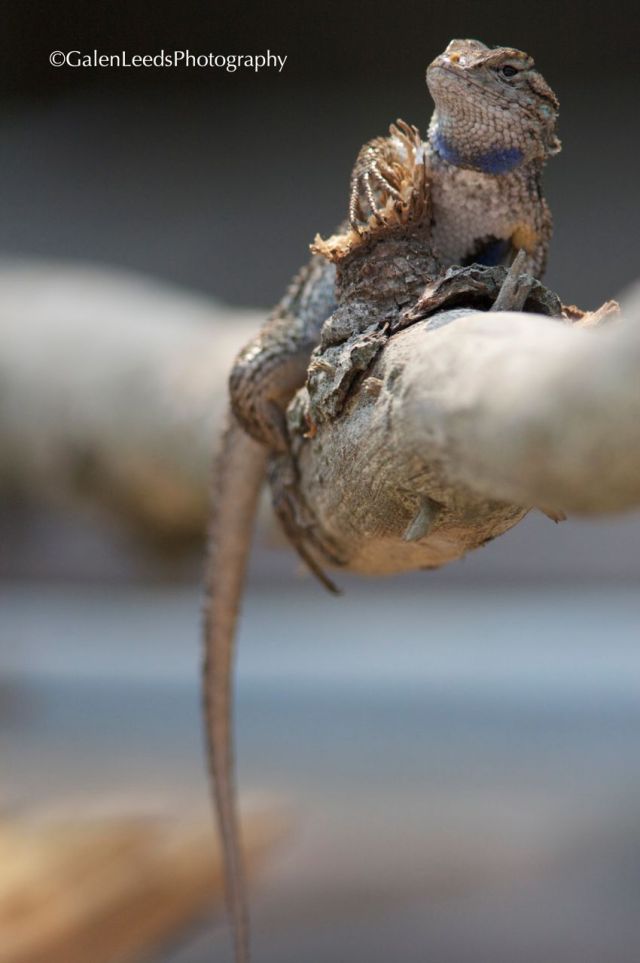
Western Fence Lizard (a.k.a. Blue-belly lizard) portrait taken just outside my friend's house

This picture was taken in a friends back yard. There was nothing special about the location, no miles of hiking, no hours of paddling. It was just right there, outside the door. Sometimes you don’t have to go very far for wildlife portraits.

On a more technical note, I did use a very open aperture (small “a” value or small “f-stop”. This is why the background is so blurred out (including the lizard’s tail). The shutter speed was fairly fast, since lizards are prone to very fast, sudden movement. The lighting was natural, but out of direct sunlight so that there wouldn’t be any harsh or deep shadows where detail would be lost. Finally, I tried shooting the lizard more or less head on, instead of from above. This gives the image more of a portrait feel.

Enjoy,

Galen

Posted in Anatomy of a photo, How To, How To, nature photography, photography, SLR, wildlife photography | Tagged , , , , , , , , , , , , , , , | Leave a comment

Do I need image stabilization in my camera or lens?


The answer to this question lies in what you intend to use your cameras and lenses for. Most people can escape without IS, VR, (or what other term your camera manufacturer uses to say that the camera and lens you are using minimizes the shaking of the person holding the camera) by using a tripod. If you are just using a point and shoot, chances are this doesn’t apply to you as most compact cameras now come with built in anti- shake devices.

If you often use a tripod, and nearly always have one near at hand, you won’t really need additional vibration reduction. That is what tripods are for.

If you have to shoot at low shutter speeds, but are in a situation where a tripod or monopod is impractical, and being able to shoot at one or two stops faster, a built in stabilizing system can start to become practical. At this point you have to begin to consider whether shooting two full stops faster is worth the money.

Some SLR cameras have the vibration reduction built in, meaning you don’t need a whole series of pricey lenses. I have heard mixed reviews on these cameras, some people loving them, others… not so much. This type of camera could save you a lot of money in the long run- if the rest of the camera works to your liking.

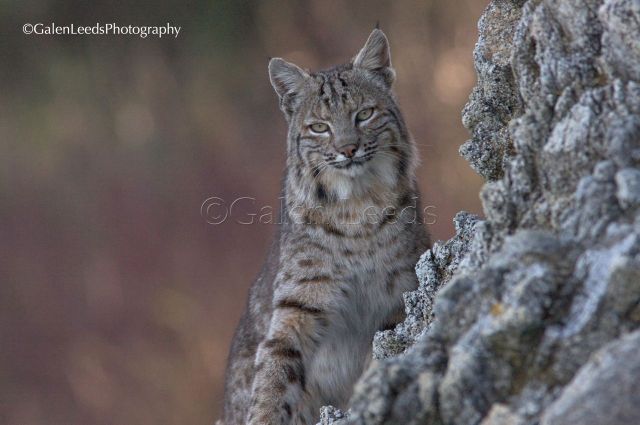
Built in vibration reduction greatly increases the cost of the lens, and sometimes of the camera itself. It can easily add a few hundred dollars onto the price tag. For me and my style of photography- kayaking (where tripods and monopods are counter productive) two being able to shoot at ISO 800 instead of 1600 makes a huge difference. I have images of bobcats that I captured crisply in low light, because I have image stabilized lenses. Most of the time though it is extraneous.

I was on my kayak. The sun had pretty much set. I had only a few brief moments to capture this image. I don't think I could have without built in stabilization.

Every tool has its purpose, and these pricier lenses can be indispensable for some, but not all of us. Buy one if it is something you really need, not just because they are cool tech.

Posted in How To, kayak photography, nature photography, photography, SLR | Tagged , , , , , , , , , , , , , , | Leave a comment

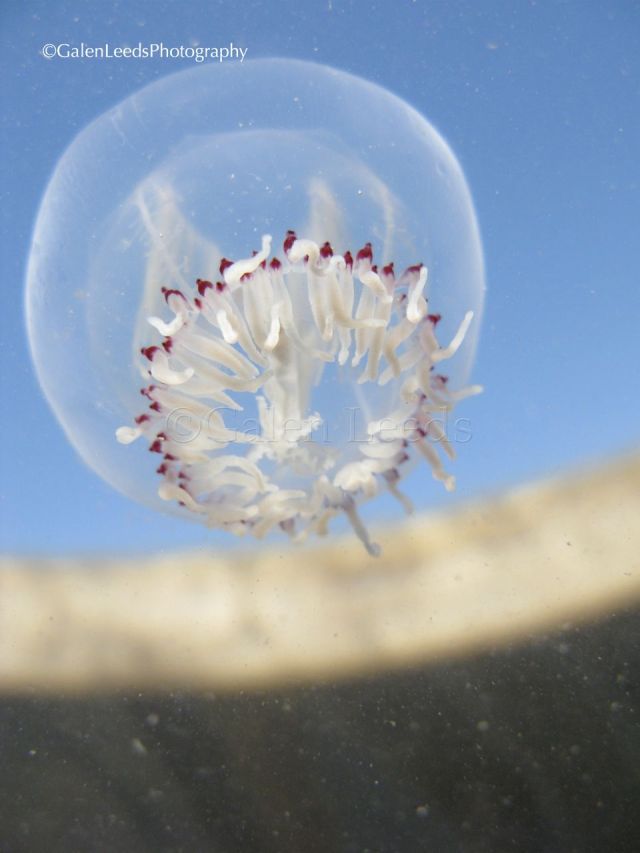
Anatomy of a photo #5: Bubble Jelly in Drake’s Estero


Underwater picture of a Bubble Jelly

This is a picture I took while kayaking in Drake’s Estero, a body of water lying within the Point Reyes National Seashore, one of my local parks.

This one was simple to take. I have a small, digital point and shoot camera with an underwater housing (these days I would just buy one of the many small digitals that can be used in and out of the water, instead of doubling my expenses by buying a camera and a housing).

I saw this really cool tiny jellyfish near the surface of the water. I have a macro setting on the camera, and I set it to that. I put my camera underwater (all settings automatic, but still in RAW shooting mode), put the camera right up to the jelly and took several images.

I had no way of seeing what I was doing (the screen was pointing towards the bottom of the estero, and the lens was pointing towards the surface) so I had to guess at composition. And got lucky. There were several that were fun, but this was my favorite.

The blurred light and dark lines in the background are the cliffs that line some of the shores of the estero.

The only thing special that I did in the first place was to be there, and then to put my camera in the water…

Happy shooting,

-Galen

Posted in Anatomy of a photo, kayak photography, marine life, nature photography, underwater | Tagged , , , | 1 Comment

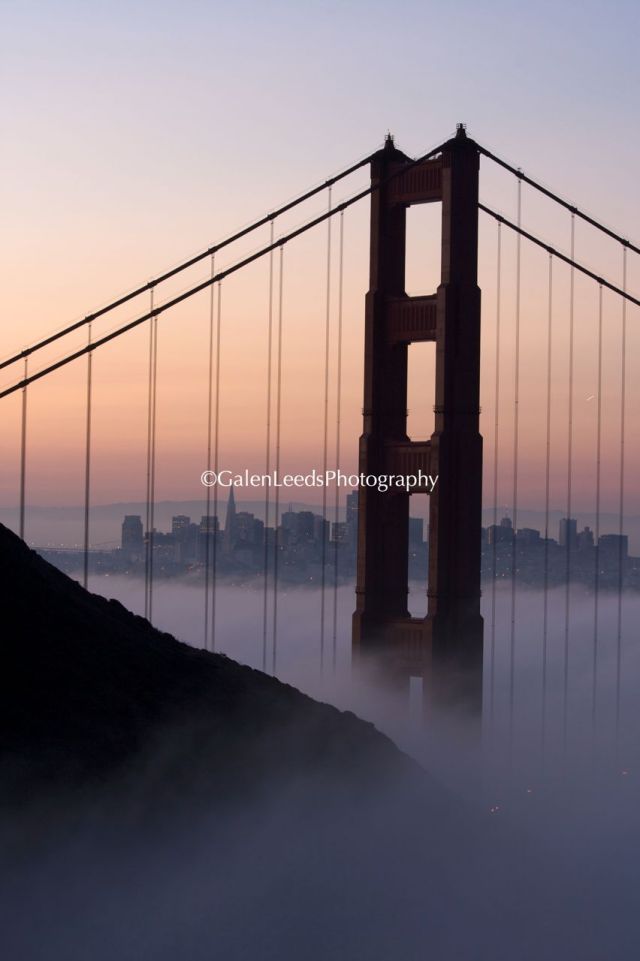
Anatomy of a photo #4: The Golden Gate Bridge at sunrise


I often feel silly taking pictures of the Golden Gate Bridge… It’s been photographed so many times, by so many people (likely it is one of the most photographed object in the bay area), at so many different times of the day in so many different conditions. I imagine that there are days when tens of thousands of pictures of it are taken, especially now that everyone has a camera in their phone or on their person. It’s hard to imagine taking a shot that hasn’t been taken before… Yet I too am caught up by it, and always seem to end up taking a picture or two of it whenever I am in the area and the light seems nice. I suppose that is what you would call photographic charisma, and would be the reason why it is a Bay Area icon known around the world.

In my mind, the key to capturing a memorable picture of something that is over photographed is to capture it in a way that others might not. How do you do this? Take the picture at times when others aren’t normally out, use an unexpected angle, focus on some part that others wouldn’t, use a wide angle when others would use a telephoto (or the opposite), get closer (or farther) than everyone else. These are just a few ideas. Photoshop is not one of those ideas for me. There was no processing of this image, other than adding the watermark to it. I did not add saturation or extra colors to the picture. There was no need.

One of the reasons I love getting up early to take pictures, is that no one else is up and about. There aren’t crowds. You can go where you want, take the pictures you want. It feels more private, the whole world feels closer. This picture of San Francisco’s most famous landmark was taken early one morning, when I was the only one around to witness a beautiful sunrise. I also wanted a sunrise picture, because I wanted pictures of the sun coming up over the bridge with San Francisco in the background. That can only happen in the morning.

I did not however know the exact picture I wanted to take. I had to see how the fog and the light were playing out together. I drove up and down the road a little, glancing constantly to the side. I when I saw something close to what I wanted, I stopped the car and parked (safely). I then hiked a ways from the road to get the perspective that I really wanted. (I didn’t want to be too high up, looking down on everything. Rarely can you get the exact shot you want from right on the road, and it can often pay off to move around just a little to find your angle.)

I set up my tripod- it would have been impossible to take a picture at this time of day without one- and set my cameras ISO to its lowest setting of 100. I wanted this to be a portrait with very little noise. I put my aperture at f10-so I would have a decent depth of field, but not have to shoot with too long of a shutter speed. There was a slight breeze, and the longer the image capture took, the more the tripod was prone to vibrate. I did some test shots and arrived at a shutter speed of 1 second. This kept some color in the sky, while not making the bridge and the city too dark.

I knew the sun would be coming up in the east, on the other side of San Francisco and a little to its left. Once the sun rose, I also knew that the bridge would become just a silhouette, that no color and little detail would be possible, because all of the light would be coming from the other side. (I did also take several pictures with the bridge silhouetted.) I played around with the composition a little more, switching from a wide angle to my 70-200 zoom. I wanted a tighter image than my wider lenses could give me. I wanted to be focused in on just the north tower, without the rest of the bridge. (I find that my 70-200 is actually one of my favorite landscape lenses… perhaps because not everyone uses it for that.) Vertical orientation helped to complement the shape of the tower, and it included many of the elements I was looking for.

And I took the picture.

All the set up, and then it is as simple as that- “I took the picture.”

Anyways, happy shooting,

-Galen
Posted in Anatomy of a photo, California, How To, How To, landscapes, Location, My favorite Parks, nature photography, photography, road side, SLR | Tagged , , , , , , , , , , , , , , , , , , , , | 1 Comment

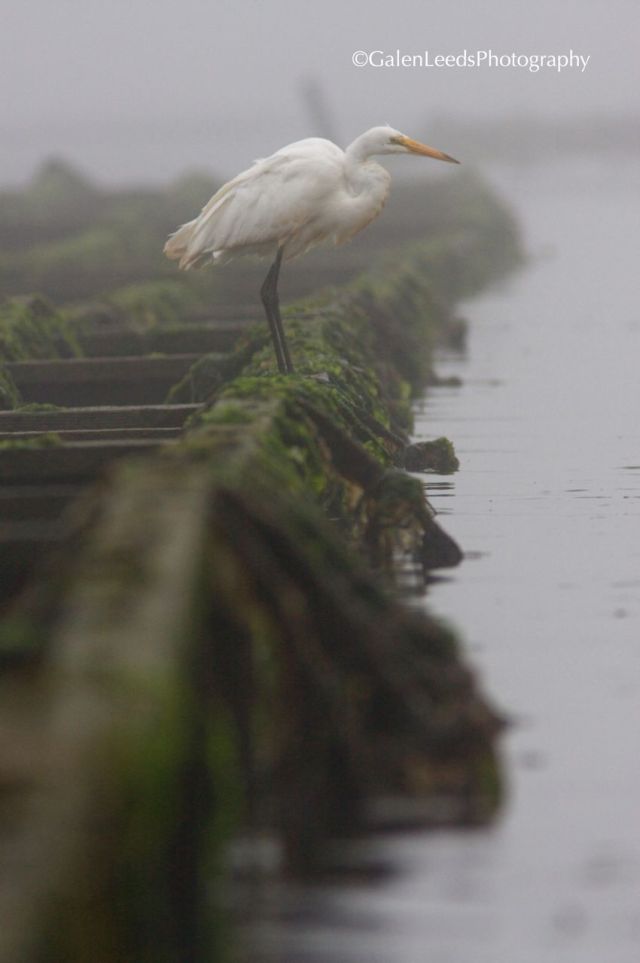
Anatomy of a photo #3: Egret fishing in fog


Egret fishing from the oyster racks in Drake's Estero on a foggy day

This image was made while kayaking early one morning on Drake’s Estero.

When I saw this egret on the local oyster farm’s racks, I knew right away that I wanted a vertical orientation to the picture. The structure of the oyster racks are too visually interesting with their long patterned length to restrict to the small space they would have occupied in a horizontal or portrait orientation. The fog was thick though- you can see how the oyster rack is slowly fading away into the fog? This is one of the very few times I have adjusted the contrast of an image in post production on the computer. The egret itself was fading away into the fog, and I had to increase the contrast and darken the image a little to give the egret a little more solidity.

The egret was walking along the rack when I first saw it. The current wasn’t too strong, so I was able to almost stop my kayak so that I was viewing down the racks (which is the perspective I wanted). I took a picture or two in case the egret flew away, and then I waited for it to get to somewhere interesting- which is when I took this picture. I liked the way the egret was at the very edge of the rack. It gives the promise of a story.

For the more technical aspects… As I said, the image was made trickier a little trickier by how thick the fog was. It also cut down on the available light, so that when I used a long lens it had to be with a fairly open aperture (420mm at f6.4) for the image. Even though I usually like using open aperture for wildlife (I like the focus to be on the animal, which happens if everything else is a little blurred out), I didn’t have much of choice on this day. With little available light, I already had the ISO as high as my camera could manage without becoming too noisy (this was at ISO 800 and you can see there is already a little noise to the image). I couldn’t lower the shutter speed any farther without risking lots of camera shake. That meant the only thing that could adjust easily was my aperture.

The egret’s head is toward the top of the image. This is the main point of interest on the bird, so I avoided placing it in the very center of the picture. It’s not right at one of the 1/3 rd marks though either, but that’s just a guide, not a law (which I further break by more or less centering the egret from left to right).

Enjoy,

Galen

Posted in Anatomy of a photo, birds, How To, kayak photography, nature photography, photography, wildlife photography | Tagged , , , , , , , | Leave a comment

Practice panning so that you can get smooth crisp movement


Now that SLRs are video capable, it becomes necessary to practice more skills. One that can be especially useful is panning. First, whenever possible use a tripod. You will have more control and a smoother result.

The actual speed of panning though can take some practice to find the right speed. This speed will vary somewhat, depending on what shutter speed you are using. Too high of a shutter speed and your video will look choppy if you pan too quickly. A similar problem can occur at some of the slower shutter speeds- moving too quickly and the pan will have too soft or a blurred feel to it. You have to be careful though, pan too slowly and the audience will get bored withthe pan and wonder when you will get to what you are panning to or for.

So practice, find that balance between blured or choppy and boring. It will be worth it in the end.

Posted in How To, photography, video | Tagged , , , , , | Leave a comment

Using a flash when photographing wildlife


The simple rule for using a flash to photograph wildlife is just that- don’t. If it is a mammal, and truly wild (not a zoo or farm animal, or animal that has become overly acclimated to having humans present) the flash will usually spook it, losing you further opportunities for more pictures. It will also unduly stress the animal.

The times when a flash is most useful are at night or in low light. Flashing animals at this time can interfere with their night vision, making their night time activities more difficult. This can threaten their very survival in a world where their life depends on their senses.

Birds are not as likely to spook, but their eyes are often of such a design that their version of red eye is much more extreme than that of people. This is especially true of the more nocturnal species.

Flashes have a limited effective range. Often times, being close enough for the flash to work properly you have to be too close to the animal for the animals comfort.

As I said, this is just the simple guideline. There are exceptions to any rule, just think very carefully before flashing any wild creature.

Posted in birds, How To, nature photography, photography, wildlife photography | Tagged , , , , | Leave a comment

Syndication


In addition to maintaining this blog, you can also read articles that I write for PhotoComment magazine and blog,

Enjoy

Posted in photography | 1 Comment

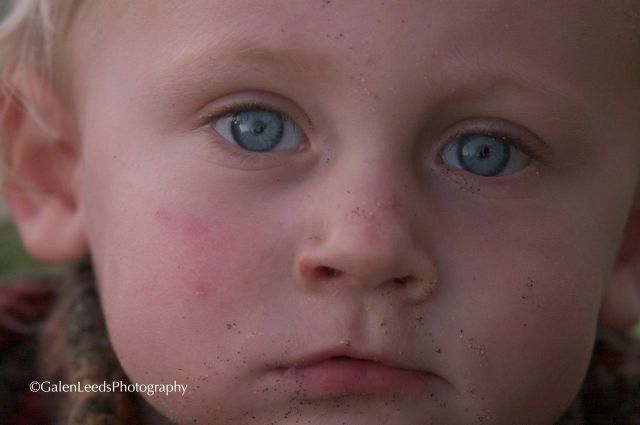
Focus on the eyes: Anatomy of a photo #2


Portrait of a child using natural light and a long lens

Lesson #1 to taking a picture of a child. Get down low. Be on their level don’t take pictures of the tops of their head.

Lesson #2 is to focus on the eyes. This is true of almost any portrait. Focus on the eyes. When we talk to people, look at people, it is the eyes that engage us. In a picture we can’t use our voice to speak, so it is our face that does our talking, and most especially the eyes.

I took this picture in shadow, without flash or any artificial lighting. Shadow is often better than direct sunlight for portraits if you don’t want to use a flash. When the subject is in complete shadow you don’t have to worry about having dark shadowed circles where the eyes would be or on the side of the nose. There are not the extremes of contrast. It is often a nice even lighting, with subtle hints of shadow upon the face. There are times where harsh shadows can make a face more interesting, but that is more often the exception than the rule.

Try to have the brightest part of the sky, or whatever is lighting the scene behind you and your camera. This way it can be reflected in your subjects eyes, giving them that extra little spark of life. It also means that your subject won’t be silhouetted, and will have the best color tones in their face. This picture was taken at the beach. The light in the eyes is the last light of the day, and is at my back. In front of me was cliffs. If I had taken the picture from the other side of the child, the picture would have been a silhouette- suitable for a landscape with a person in it, but not a portrait.

This picture was taken with a fairly long focal length- 420mm. This gave me a shallower depth of field, even though my aperture was at 5.7 (meaning that even though the eyes are in focus, the ears are out of focus). Such a long lens also meant that there would be little distortion from the lens (some of the wider angle lenses can change the shape of a face). An alternative to this long of a lens is a shorter lens while still maintaining the shallow depth of field,  is to open aperture wider (meaning a smaller aperture number such as 2.8 or 1.2). I usually will not go shorter than a 50mm lens on portraits however, unless I am trying to elongate or distort some part of the body, such as the legs or arms.

I also prefer long lenses when photographing children, because it allows me to be farther away, not so much in their face, which I feel often allows them to relax more. Adults on the other hand, if you point a really big lens at them become more nervous (unless you are far enough away that they don’t really notice you.)

Happy shooting,

Galen

Posted in Anatomy of a photo, How To, How To, photography, portraits, SLR | Tagged , , , , , , , , , , , , , , , , | Leave a comment

Avoid clutter in your images now. Don’t rely on Photoshop later


One of the simplest things a person can do to improve their images is to look over the scene where they are shooting, before taking the picture. The things to keep your eyes out for are wires in the air, pieces of garbage on the ground, or anything else that will mar an image when it is viewed at a larger size.

Often these small details won’t be very noticeable when taking the picture or reviewing it on the cameras screen, but often when viewed at a printable size, they can be very distracting and dominate the image more than you would like. Yes, it may be possible to crop the offending bit out later on your computer, but sometimes that will mean cropping out other important elements. Other post production tricks are cloning and stamping in Photoshop, but this could mean a considerable amount of computer work.

Often, just taking a few steps in one direction, or crouching down can eliminate low hanging wires. Or a few seconds to pick up and dispose of some trash. Save yourself extra work and the risk if having to crop a new composition by focusing on the image when it’s in front of the camera. You’ll thank yourself later.

Posted in How To, How To, photography, SLR | Tagged , , , , , , | Leave a comment